Use the terminal interface
Browse submodules, preview and run updates, and change what they track, with single keys.
Start it
lazysubmodules tui
Run it anywhere inside the superproject. The terminal interface needs a
terminal on standard input and output that can move the cursor: TERM
must be set and must not be dumb. Otherwise tui exits with status 2
and says why; tui lists the messages. To try it without
touching your own repositories, use the demo.
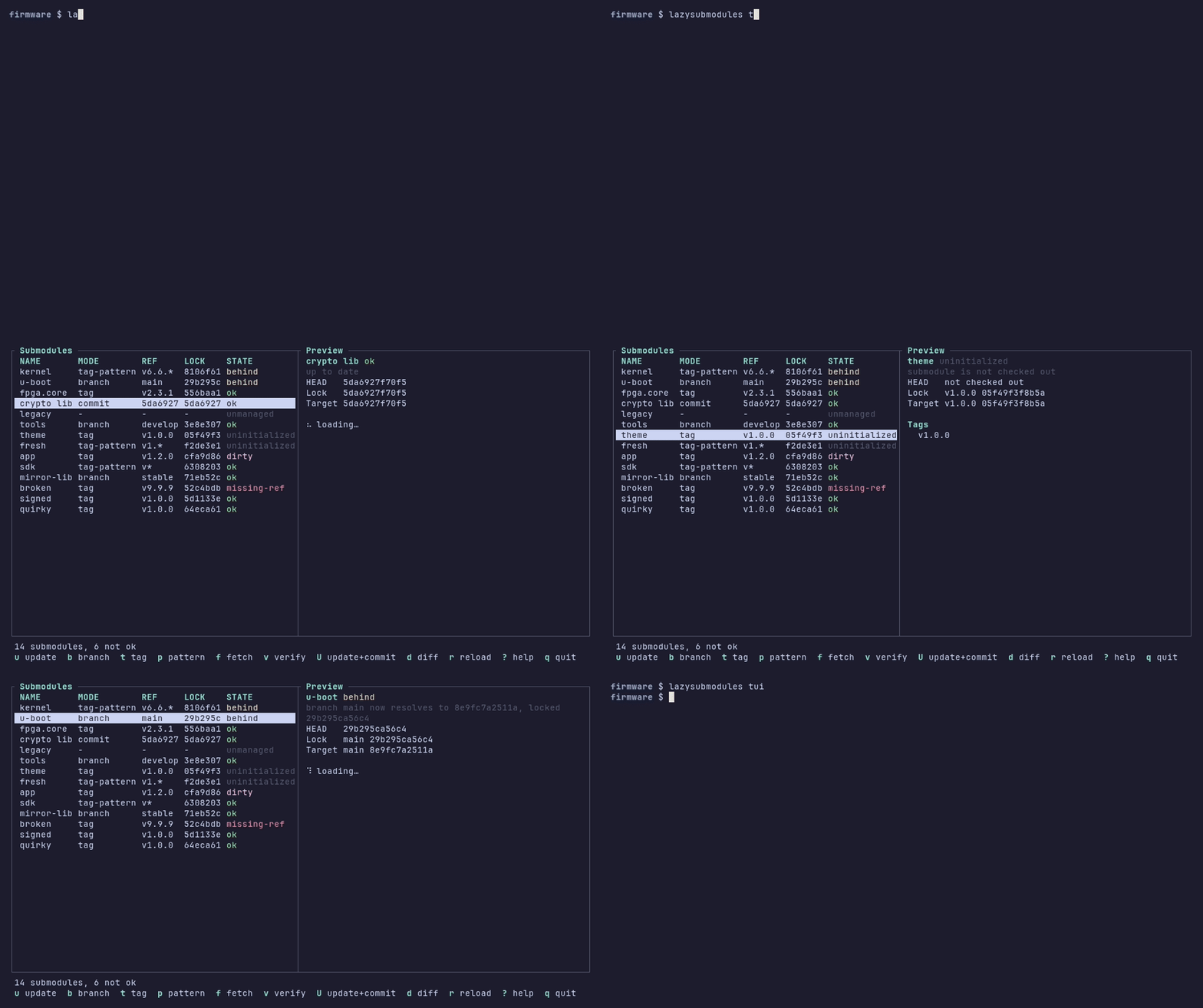
The screen
- Table
One row per submodule, in
.gitmodulesorder, with its name, mode, configured ref, locked commit and state. In narrow terminals theLOCKcolumn is dropped first, thenMODE.- Preview
For the selected submodule: why it is in its state, its HEAD, lock entry and update target, the commits an update would add (
Update adds), the difference between the lock entry and HEAD, the recent log and the tags. It uses local refs only, and it is hidden in terminals narrower than 80 columns.- Status bar
A summary such as
14 submodules, 6 not ok, or the result of the last action, or an error.- Key bar
The main keys, and more of them in wide terminals:
u update b branch t tag p pattern f fetch v verify ? help q quit.
Move with ↑ ↓ or k j, page with PgUp
PgDn, and jump with g G. Enter opens the
details of the selected submodule, with its path, URL, tracking
configuration, native branch key and full commit IDs. ? shows
all keys. Terminal interface keys lists every binding.
Update a submodule
u updates the selected submodule and stages the result, like
lazysubmodules update <name>. U also commits it, like
update --commit.
Dry run. The interface first runs a dry run and shows its result, then asks:
┌ Update ──────────────────────────────────────────────────────┐
│ Update u-boot: main (29b295c) -> main (8e9fc7a)              │
│ Stage the result in the superproject?                        │
│                                                              │
│ y confirm   n cancel                                         │
└──────────────────────────────────────────────────────────────┘
With U, the dialog is titled
Update and commitand asksCommit the result in the superproject (git commit -s)?. y works only once the result is shown.Answer. y runs the update; n, Esc or q cancels.
Outcome. The status bar says what happened, for example
u-boot: updated to main (8e9fc7a), stagedorkernel: updated to v6.6.10 (08dcd0d), committed db24b88.
Some updates need no question:
Refusals appear in the status bar at once, for example
error: app: refused: submodule has uncommitted changes.Nothing to do:
sdk: already up to date.
The question also tells you when the update changes nothing that the
index (u) or HEAD (U) records, for example when it only
initializes the submodule:
Update theme: v1.0.0 (05f49f3), initialize
The index records this already; nothing is staged.
Continue?
The outcome is then theme: initialized at v1.0.0 (05f49f3). With
U, the question also says when a change staged for the submodule
would be discarded, as update --commit does (see
Commit updates), and when the update is staged
already.
u and U never use the network. A submodule that needs a
clone is refused with a hint:
error: fresh: refused: submodule is not initialized (press f to fetch).
Fetch, verify and inspect
- f
Fetches the selected submodule, cloning it first if needed, like
lazysubmodules fetch <name>. It is the only key that uses the network. The status bar then shows, for example,fresh: cloned and fetched.- v
Verifies the selected submodule and lists every check with its result, like
lazysubmodules verify <name>.- d
Shows the gitlink diff of the submodule in the superproject.
- r
Reloads the table, for example after you changed something in another terminal.
Long-running operations run in the background with a spinner, so the interface never blocks. Only one modifying operation runs at a time; other modifying keys are ignored with a note meanwhile.
Change what a submodule tracks
b, t and p change the tracking configuration, like
lazysubmodules set. They change only .gitmodules, after a
confirmation; press u or U afterwards to update.
b opens a list of the branches, and t a list of the tags. The current one is marked; / filters the list, and Enter chooses.
p asks for a tag pattern. While you type, it counts the local tags that match, lists the highest of them and marks the pre-releases:
┌ Track kernel by tag pattern ─────────────────────────────────┐
│ pattern: v6.*                                                │
│                                                              │
│ 12 local tags match (2 pre-release)                          │
│   v6.7-rc1 pre-release                                       │
│   v6.6.11-rc1 pre-release                                    │
│   v6.6.10                                                    │
│   v6.6.9                                                     │
│   v6.6.8                                                     │
│   … 7 more                                                   │
│                                                              │
│ Pre-release tags are skipped by an update,                   │
│ unless the lock records one already.                         │
└──────────────────────────────────────────────────────────────┘
An invalid pattern cannot be submitted. Enter submits, and the confirmation says
Track kernel by tag pattern v6.*? It matches 12 local tags.The status bar then showskernel: now tracks tag-pattern v6.*; press u to update.

See Change what a submodule tracks for what each mode means.
Errors
Errors appear in the status bar, prefixed with error:. An error that is
too long for the bar also opens in a dialog, which Esc or q
closes. The interface never exits because of an error.
Leave the interface
q quits from the table. In a dialog, the details or the help, it closes that first. In text fields, the pattern dialog and the filter of a list, q is typed as text; Esc leaves them.
While an operation runs, q asks before quitting, because quitting interrupts the operation.
Ctrl+C quits at once, from anywhere, and interrupts a running operation, which then puts back what it changed.
An interrupted operation finishes after the screen closed, and
lazysubmodules tuiprints its outcome. When it failed, the exit status is that of the failure, for example 5 for an interrupted update.SIGINT,SIGTERMandSIGHUPsent to the process end the interface the same way. The error names the signal, and the exit status is 1 unless an interrupted operation failed:lazysubmodules: terminal interface: terminated signal received
See Signals for how commands handle signals.
Colors
States are colored, and headings and the selection use bold text and
reverse video. Set NO_COLOR to any non-empty
value to turn the colors off; bold text and reverse video remain.
Git without a terminal
While the interface is shown, Git runs in a session of its own, without
access to the terminal, and with GIT_TERMINAL_PROMPT=0. A prompt fails
instead of drawing over the screen. For f, and for hooks that run
during u and U, credentials must come from a credential
helper or an SSH agent, and SSH host keys must already be known.
Git without a terminal in the TUI explains the details and the workarounds.
See also
Terminal interface keys: every key and dialog.
tui: requirements and messages of the
tuicommand.Update submodules: what
uandUdo underneath.